


요즘 미국에서 미성년자 sns 규제가 본격화 되면서 구글과 apple에서도 관련 api를 발표했고, 26년 1월 1일부터 시행되는 SB2420으로 인해 미국 텍사스에서 서비스 하는 앱들은 법규를 준수하기 위해 이에 대한 대응이 필요하다고 한다.
참고로 해당 api들은 iOS 26.2 이상 버전부터만 사용 가능하다.
앱 사용자 나이 받아오기

target -> Capability에서 Declared Age Range 추가
    do {
        let result = try await AgeRangeService.shared.requestAgeRange(ageGates: 18, in: vc)
        switch result {
        case .declinedSharing:
        	// 연령 공유 거부 했을 경우
        case .sharing(range: let range):
            if let lowerBound = range.lowerBound {
                // 연령범위의 가장 낮은 값
            }

            if let upperBound = range.upperBound {
                // 연령 범위의 가장 높은 값
            }

        @unknown default:
            return .unknown
        }
    } catch AgeRangeService.Error.notAvailable {
    	// 연령 공유 권한이 없을 경우
    } catch {
        // 연령 공유 요청 실패 했을 경우
}AgeRangeService.shared.requestAgeRange를 이용하여 사용자 나이 요청.
공식 문서에서는 사용자의 나이가 ageGates에 입력한 나이보다 작다면 lowerBound의 값이 nil로 와서 guard문으로 처리 하고 있던데, 내가 샌드박스 환경에서 테스트 해본 바로는 lower Bound에 나이가 들어있는 경우도 있고, lower Bound에 값은 없고 upperBound에만 값이 들어 있는 경우도 있어서 둘 다 처리하도록 했다.
나이 테스트
이제 나이가 정상적으로 오는지 확인하고 싶을 텐데, 핸드폰의 설정에 들어가서 애플 계정의 나이를 변경하지 않아도 샌드박스 테스트 환경 설정을 이용해서 테스트 해볼 수 있다.
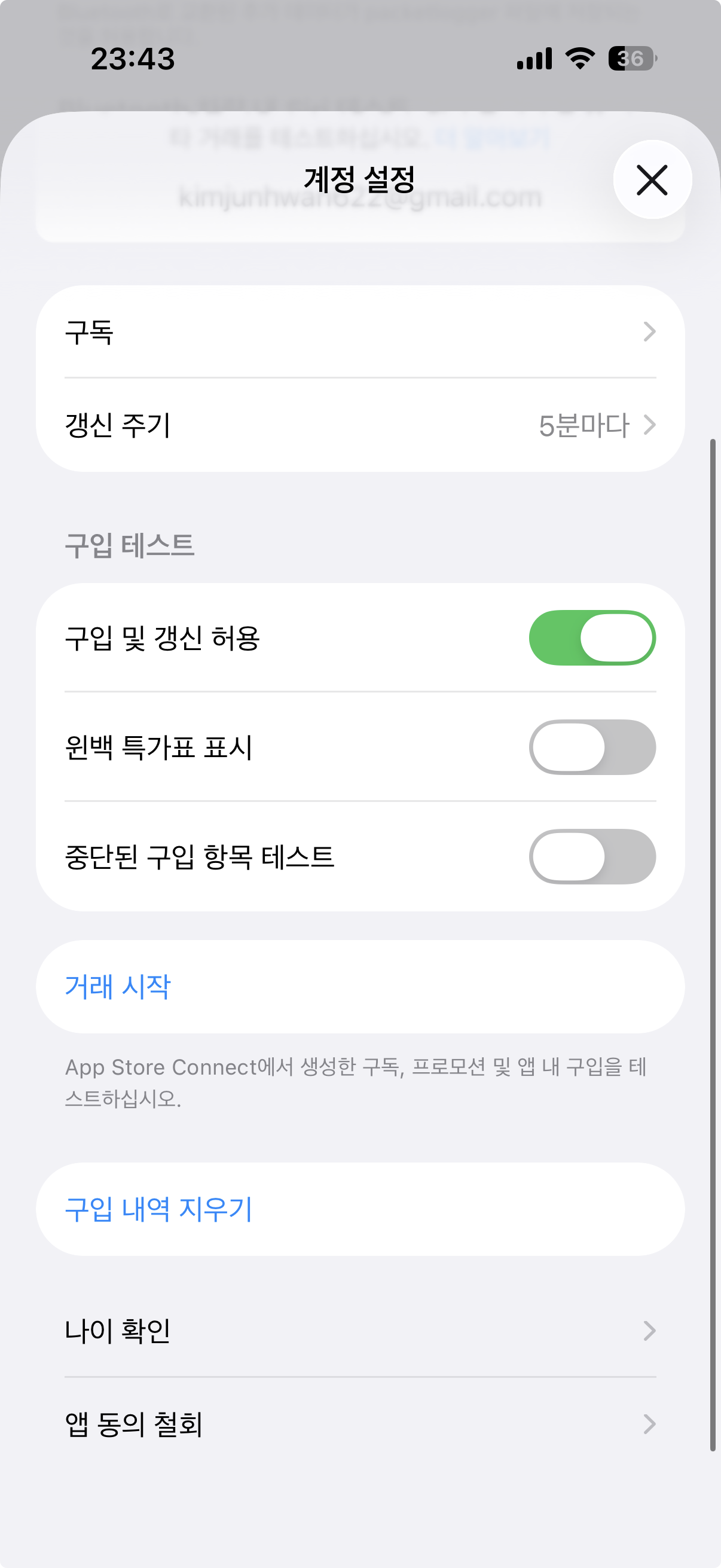
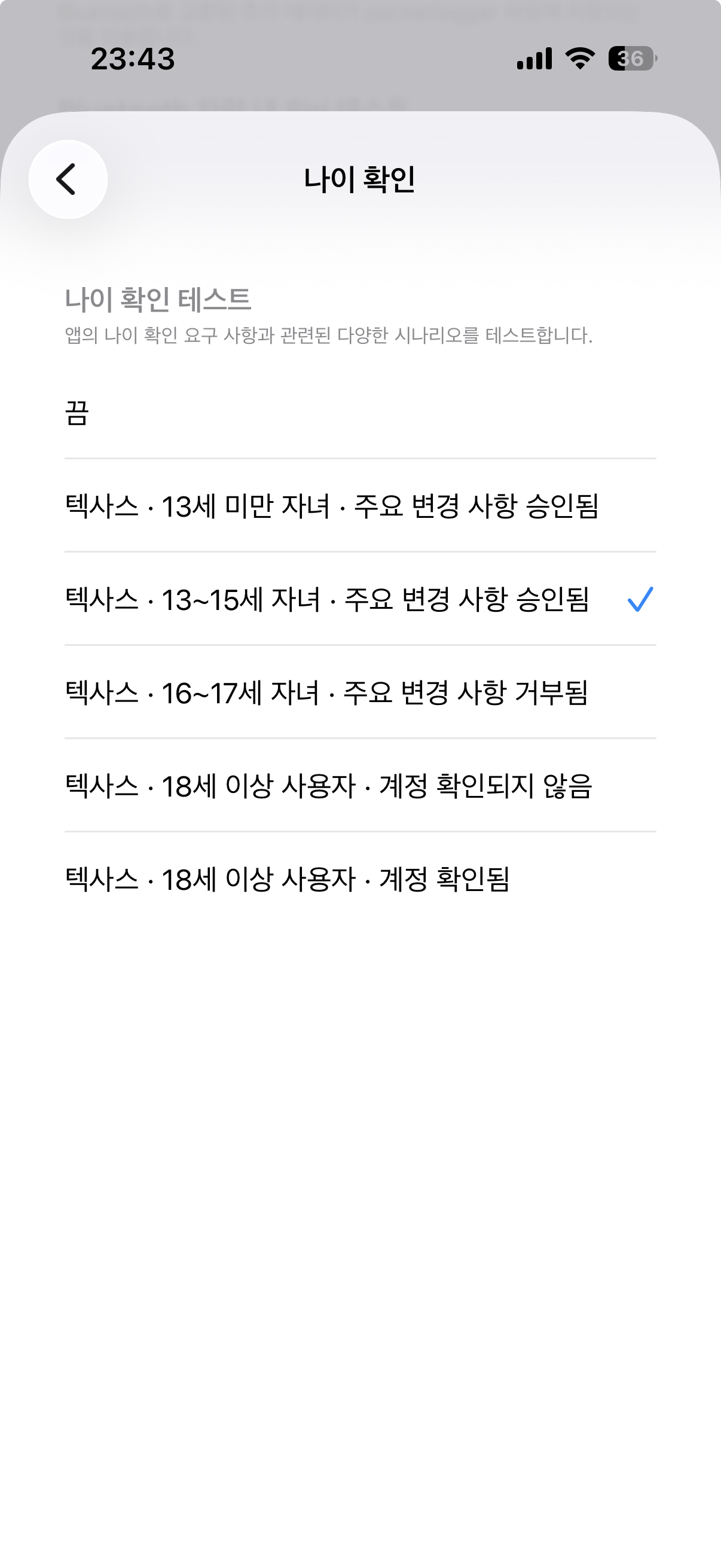
설정 -> 개발자 -> 샌드박스 Apple 계정 -> 나이 확인을 통해 테스트가 가능하다.

해당 api의 응답을 print해보면 요런식으로 응답이 오고 있다.
부모에게 사용 허용 요청
PermissionKit을 이용하여 부모에게 앱의 사용 허용은 인앱으로 구현할 수 있다.
https://developer.apple.com/documentation/PermissionKit
PermissionKit | Apple Developer Documentation
Create communication experiences between a child and their parent or guardian.
developer.apple.com
본래 해당 프레임워크의 목적은 채팅 기능같이 다른 사람과 채팅을 하려고 할때, 부모에게 이에 대한 허용 요청(채팅하려는 사람이 누구인지, 프로필 이미지 등등)을 imessage로 보내는걸 목적으로 설계된 프레임 워크같은데 앱 업데이트에 대한 허용 요청도 껴있어서 권한을 요청 및 화면을 분기처리 할 수 있다.
내가 구현한 방식은 swiftUI의 뷰 내부 또는 UIViewController에서 api를 직접 호출하지 않고 따로 모듈로 분리하는 방식으로 구현했다.
PermissionKit의 권한 요청에 대한 응답은 요청에 대한 리턴값이 있는게 아닌 앱 푸시처렴 별도의 스트림으로 요청에 대한 응답이 오므로 응답을 작업을 반드시 먼저 호출해야 한다.
protocol AgeRepository {
    @available(iOS 26.2, *)
    func listenPermission()

    @available(iOS 26.2, *)
    func requestPermission(_ vc: UIViewController) async throws -> Bool
}
- listenPermission: 요청한 권한에 대한 응답을 받는 Task 생성 역할
- requestPermission: 권한 요청 및 권한 요청에 대한 응답을 리턴
private var continuations: [String: CheckedContinuation<Bool, Error>] = [:]

func listenMinorHasPermission() {
        Task.detached {
            for await response in AskCenter.shared.responses(for: SignificantAppUpdateTopic.self) {
                let topicDescription = response.question.topic.description

                let result: Bool
                switch response.choice.answer {
                case .approval:
                    result = true
                case .denial:
                    result = false
                @unknown default:
                    result = false
                }

                if let continuation = self.continuations.removeValue(forKey: topicDescription) {
                    continuation.resume(returning: result)
                }
            }
        }
    }


func requestPermission(_ vc: UIViewController, reason: PermissionReason) async throws -> Bool {
        print("[AgeRepositryImpl] - request permission - \(reason)")
        let topic: SignificantAppUpdateTopic = SignificantAppUpdateTopic(description: "TEST")
        let question = PermissionQuestion(significantAppUpdateTopic: topic)

        return try await withCheckedThrowingContinuation { continuation in
            continuations[topicDescription] = continuation
            Task {
                do {
                    try await AskCenter.shared.ask(question, in: vc)
                    print("[AgeRepositryImpl] - Successfully asked for permission, waiting for response for reason: \(reason)")
                } catch {
                    if let errorContinuation = self.continuations.removeValue(forKey: topicDescription) {
                        errorContinuation.resume(throwing: error)
                    }
                }
            }
        }
    }
요청에 대한 응답을 리턴값으로 받을 수 있도록 CheckedContinuation을 이용하여 응답을 받을때까지 기다리도록 하고, 응답을 받은 경우 요청한 권한인지 description을 으로 값을 찾은 후 resume을 호출하도록 구현.
샌드박스 환경에서 테스트 해봤을때 정상적 정상적으로 값이 리턴 되지만, 실제 iMessage로 요청을 보낸 후 어떤식으로 값이 리턴될지는 아직 테스트가 불가능해서 확인하지 못했다. 만약 iMessage만 보내고 어떤 값도 주지 않는다면... 핫픽스가 필요할 것 같다.
'iOS > 앱 개발' 카테고리의 다른 글
| OperationQueue을 이용한 UICollectionView 성능 개선 (0) | 2024.04.10 |
|---|---|
| Alamofire의 응답값을 처리하는 여러가지 방법 (1) | 2024.01.15 |
| API의 response status를 좀 더 구조적으로 핸들링 해보자 (0) | 2023.12.24 |
| URLSession으로 multipart/form 방식으로 데이터 전송 (0) | 2023.12.17 |
| 권한 요청, 설정 이동을 추상화(protocol)를 이용하여 재사용 가능하게 사용하기 (1) | 2023.11.21 |